Hospital Reception Management System (HRMS)
An offline-first Windows desktop OPD & revenue management system for district hospitals — registration, categorized OPD fees, queue management, appointments, and daily cash reconciliation.
Case study
How this was built, in the order I'd walk someone through it.
- 01
Problem
The hospital ran reception on paper. Four OPD desks — General, Specialist, Laboratory and Emergency — each registered patients, took a different fee, and issued a different government-formatted slip, and none of it reconciled against the cash drawer at the end of the day. Any system replacing that had to keep working when the network didn't, because a reception desk that stops taking patients is not an option in a district hospital.
- 02
Users
Super Admin (owner / IT)Medical SuperintendentReceptionists — one per OPD deskAccountant - 03
Architecture
Two Electron apps. The server app runs on the hospital's main PC and hosts an in-process Express API plus local PouchDB databases — it is the only machine that holds data. The reception desks run a client app that is the same React interface with no database, pointed at the server's LAN address. CouchDB replication is optional and off by default; when a URI is configured, databases replicate under an `hrms_` prefix so they never collide with anything else on that CouchDB.
- 04
My responsibility
I owned the system end to end — the four OPD registration flows, the fee configuration model, slip generation and printing, the server/client LAN split, and the accountant's day-end closing workflow. I also handled packaging and the on-site install.
- 05
One important feature
Offline-first by default, sync as an opt-in
Every read and write hits PouchDB on the server PC, so the system has no runtime dependency on the internet at all. Reception keeps registering patients and printing tickets through an outage. Replication to CouchDB is a separate, optional concern for multi-site backup — never something a receptionist has to think about or wait for.
- 06
How it works internally
The Express layer exposes controllers over PouchDB design docs. Searches (by patient ID, name, or phone) and the accountant's date-range reports are served by indexed views rather than full scans, with pagination on top, which is what keeps the app responsive as visit counts climb into the hundreds of thousands. Fees are config-driven: hospital type, the fixed General fee, per-specialty fees and per-test laboratory prices all live in Hospital Setup, so a fee change is a settings edit rather than a redeploy. Slips render as full A4 documents with the AJK Health Department header, carrying serial, CRP, receipt number, CNIC and visit details.
- 07
Challenge
Two constraints pulled against each other. The machines are low-end hospital PCs on a network that drops, so the system had to be resilient and light. But the output is a government document — the slips have a mandated layout — and the people producing them are non-technical staff working through a queue of patients. Precision on the output, near-zero friction on the input.
- 08
How I solved it
Local-first storage removed the network from the critical path entirely. On the UX side I cut every decision a receptionist didn't need to make: the login has no role selector at all — an email signs in the Super Admin, a username signs in staff, and the role comes from the credential. Desks are assigned per account, so a receptionist lands directly on their own registration screen. The login and navbar are colour-coded by machine (blue Server Station, amber Reception Desk) so nobody has to work out which PC they're on. Day-end closing walks the accountant desk by desk and requires a written reason and resolution for every cash shortfall, and a reason for closing early.
- 09
Trade-off
Local PouchDB means there is no single cloud source of truth, and multi-site replication is genuinely more complex than pointing everything at one hosted database. I took that complexity deliberately: for frontline staff in a district hospital, uptime beats architectural tidiness, and the sync complexity is paid by me once rather than by reception every time the link drops.
- 10
What I learned
Constrained environments reward removing choices, not adding features. The changes that cut support calls most were the smallest ones — deriving the role from the credential, colour-coding the station, landing each user on their own desk. And building against real government paperwork taught me to treat the printed artifact as a hard interface spec, not as a view I could restyle later.
Screens
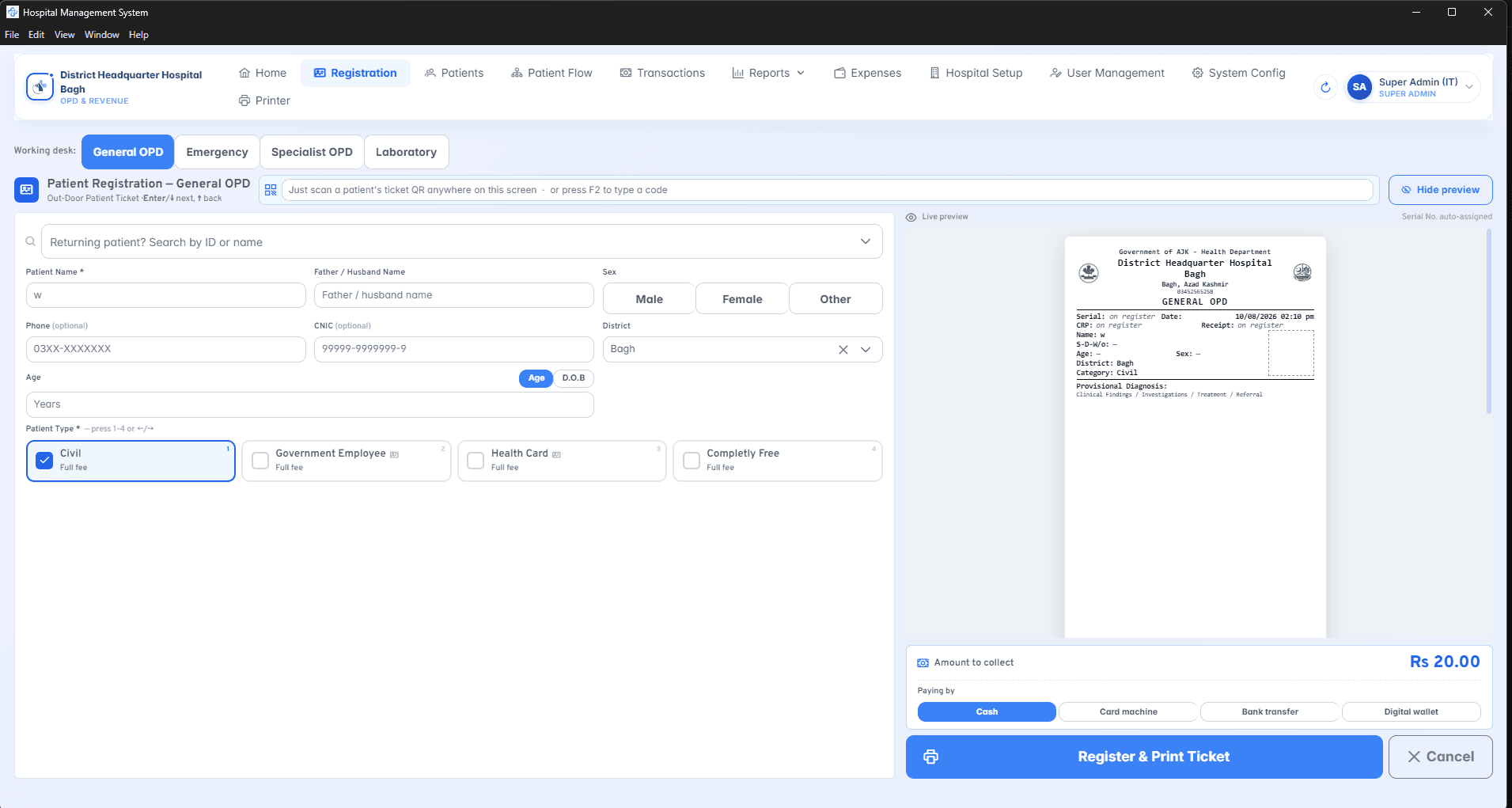
General OPD registration + live slip preview
The screen the system lives or dies on. Desk switcher across the four OPDs, patient type driving the fee, and a live preview of the A4 government ticket rendering as the form is filled.
Super Admin overview
Revenue split by collection method, plus per-receptionist workload — the view the Medical Superintendent uses to see who is carrying the queue.
Patient Flow analytics
Visits counted rather than rupees — arrivals over time, busiest hour, and desk mix, filterable by desk, patient category and date range.
User management & desk access
23 accounts with per-desk access chips. A user can hold one desk or several; 'never signed in' surfaces accounts provisioned but not yet handed over.
Reception desk sign-in (client)
Client machines pick the server by LAN address and remember it. The green banner marks this as a Reception Desk rather than the server station, and there is no role selector — the credential decides.