Cafe POS — Offline-First Restaurant Point of Sale
A Windows desktop point-of-sale for cafés and restaurants — order taking across takeaway, delivery and dine-in, a menu model with sizes and add-ons, kitchen station routing, shift and expense tracking, and a per-screen staff permission matrix.
Case study
How this was built, in the order I'd walk someone through it.
- 01
Problem
Small cafés get squeezed between two bad options: a paper-and-calculator counter, or a cloud POS that charges per month and stops selling the moment the connection drops. What they actually need is the boring middle — a till that takes orders reliably, prices a menu that has sizes and add-ons, tells the kitchen what to cook, and tells the owner at the end of the day what came in and what went out.
- 02
Users
OwnerManagerCashierWaiterKitchen / baristaAccountant - 03
Architecture
An Electron desktop app with an in-process server on port 8300 and a local document database, namespaced with a `cafe_` prefix. It runs standalone by default — the System screen reports 'Local-only'. Point additional terminals at the counter PC's IP and they become clients of that server; set a CouchDB URI and terminals replicate instead, which is how a second till or a kitchen display joins without a rewrite.
- 04
My responsibility
Built end to end — the order flow, the menu and modifier model, the permission system, shift and expense tracking, reporting, and the backup/restore and sync configuration.
- 05
One important feature
A permission matrix, not a role dropdown
Roles (Manager, Cashier, Waiter, Kitchen/Barista, Accountant) are one-click presets that stamp a full grid of per-screen capabilities — View, Create, Edit, Void, Delete — which the owner can then tune per person. Void on Orders is its own capability, separate from Edit, because voiding a paid order is the action that actually costs money.
- 06
How it works internally
A menu item is not a name and a price. It carries optional portions (each size its own price), optional add-ons drawn from whole categories or hand-picked items, and a station — Kitchen or bar — that decides which display the line prints to. The cashier composes an order from those pieces and the ticket total builds up line by line as each add-on stays its own priced row rather than being folded into the parent. Orders are tagged Takeaway, Delivery or Walk-in at the top of the flow, since that choice changes both the tax and the fulfilment path. Shifts bracket the day, and expenses are captured against categories so the dashboard can show net rather than just takings.
- 07
Challenge
The counter is the least forgiving environment a UI can run in. A cashier is standing, mid-conversation with a customer, with a queue behind them — every extra tap is a real cost. But the same app also has to satisfy an owner who wants menu configuration, staff permissions, reconciliation and reports, which is a genuinely deep set of screens.
- 08
How I solved it
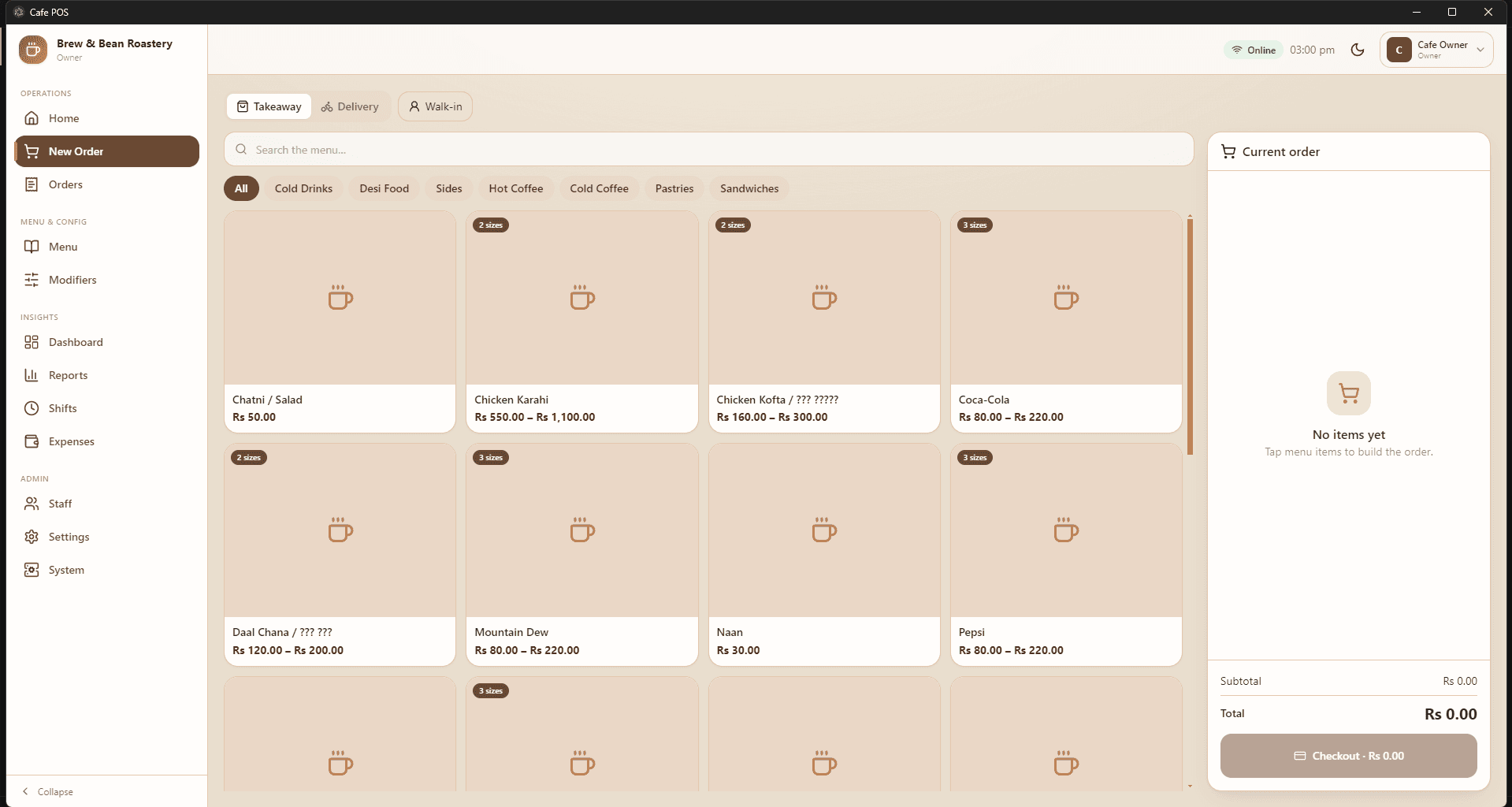
I split the app by tempo rather than by feature. Operations (Home, New Order, Orders) are optimised for speed — the order screen is one flat grid with category filters and a live cart, no nesting, no modals in the hot path. Everything slow — Menu, Modifiers, Staff, Settings, System — sits behind separate sections that a cashier's permission set simply never renders. The heavy configuration lives in modals with explicit Save/Cancel, so a half-finished menu edit can't leak into service.
- 09
Trade-off
Local-first means each installation owns its data, so there is no central back office spanning multiple branches out of the box, and backup is a deliberate act — a JSON export — rather than something a cloud provider handles invisibly. For a single café that is the right trade: no subscription, no outage risk, full data ownership. For a chain it would need the CouchDB path turned on and a real reporting tier above it.
- 10
What I learned
Modelling the menu properly was worth more than any feature I could have added on top of it. Once portions, add-ons and stations were first-class rather than bolted on, order taking, kitchen routing and reporting all fell out of the same structure. It's the clearest case I've had of the data model deciding how good the product could get.
Screens
Order screen
The hot path. Order type across the top, category filters, a flat item grid showing size counts, and the running cart pinned right. No nesting between a cashier and the checkout button.
Menu item editor
Where the model shows: per-size pricing, add-ons pulled from whole categories or specific items, and the kitchen/bar station that decides where the line prints.
Staff & permissions
Role presets stamp a capability grid that stays editable per person. Void is deliberately separate from Edit on Orders.
System administration
Record counts per collection, JSON backup and restore, and the server/sync switch — blank on the counter PC, the server's IP on any other terminal.