AfroMarket Supplier App — Android & iOS
The supplier-side Flutter app for the EFG AfroMarket B2B marketplace: onboarding, live order analytics, buyer messaging, and a six-language localization layer including a full right-to-left Arabic layout. Live — published by the client.
Case study
How this was built, in the order I'd walk someone through it.
- 01
Problem
AfroMarket's platform side already existed as web dashboards. The gap was the supplier: often mobile-first, frequently not an English speaker, and needing to register, respond to buyer inquiries and watch their orders from a phone. An English-only web dashboard was never going to reach them.
- 02
Users
Suppliers across AfricaBuyers they trade withThe client's platform team - 03
Architecture
A Flutter client for Android and iOS against the platform's REST API — the same backend behind the web buyer, supplier and super-admin dashboards. Localization uses Flutter's own `AppLocalizations` codegen over structured ARB files, one per locale.
- 04
My responsibility
The supplier app and the localization layer across it, built to a production-ready handover — the client owns the store listings and publishes.
- 05
One important feature
Six languages, including right-to-left Arabic
English, French, Spanish, Arabic, Swahili and Hausa. Arabic is the one that matters technically: not a string swap but a full directional flip — the drawer slides from the right, chevrons reverse, icon and label order mirrors, and every layout has to hold under both directions.
- 06
How it works internally
Copy lives in structured ARB files keyed by meaning rather than by screen, so a shared label is translated once and no string stays hard-coded in a widget. Flutter's codegen turns those into a typed accessor, which makes a missing key a build error rather than a blank space found in production. Directionality is derived from the active locale rather than set per widget, so RTL propagates through the tree instead of being handled screen by screen. Language selection sits in the drawer and applies immediately.
- 07
Challenge
RTL is where localization stops being translation and becomes layout engineering. Anything positioned with a hard-coded left or right — padding, alignment, a trailing chevron, an avatar beside a name — is correct in five languages and visibly broken in the sixth. And it fails quietly: nothing crashes, it just looks wrong to exactly the users you can't easily get feedback from.
- 08
How I solved it
I worked in direction-relative terms throughout — start and end rather than left and right — so mirroring falls out of the framework instead of being hand-maintained per screen, and reviewed every screen in Arabic as a first-class pass rather than a final check. Keying ARB entries by meaning kept the translation surface small enough that six locales stayed maintainable as screens changed.
- 09
Trade-off
Six locales is a real ongoing tax: every new string is six edits and a re-translation before a feature can ship. For a marketplace whose entire value is cross-border reach that trade is worth making — but it is a genuine cost, and on a product with a narrower audience I would not pay it.
- 10
What I learned
Design the localization architecture before the second screen, not after the tenth. Retro-fitting direction-awareness is a per-widget audit across the whole app; building on start/end primitives from the start makes RTL close to free. I also came away treating language as part of the product surface rather than a setting — for these users it decides whether the app is usable at all.
Screens
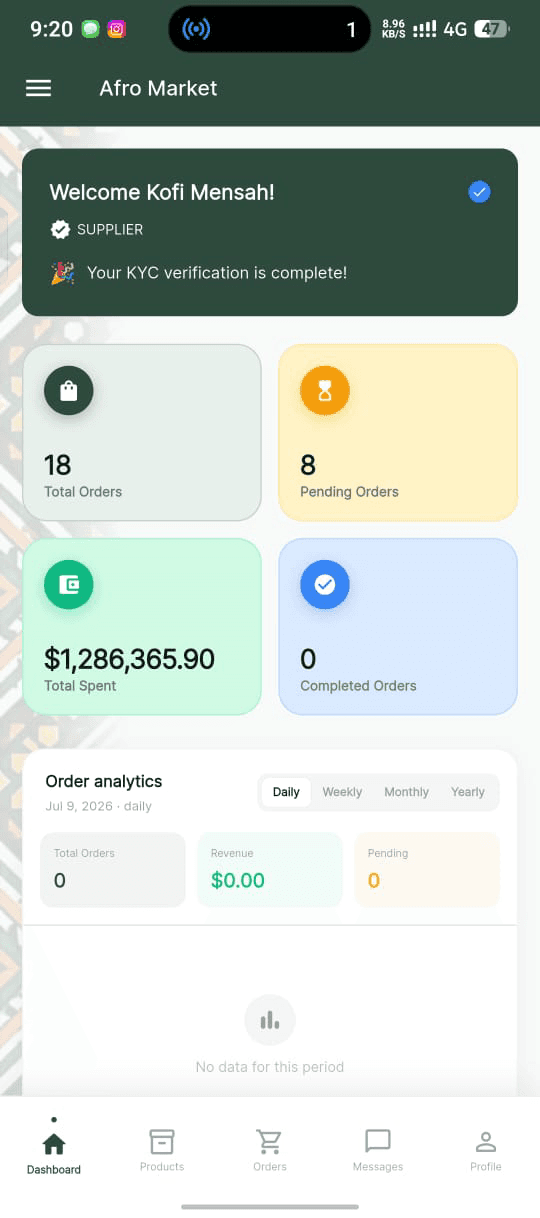
Supplier dashboard
Order counts and spend up top, then order analytics switchable across daily / weekly / monthly / yearly.
Supplier sign-in
Trust signals carry real weight in B2B onboarding — KYC verification, escrow protection and encryption stated before the first field.
Supplier profile
Verification badge and buyer rating as first-class profile elements, with language and display currency both user-selectable.
Supplier ↔ buyer messaging
In-app threads with file sharing, so quotes and documents stay attached to the conversation.
Navigation — English
Baseline. Drawer opens from the left, chevron points right.
Navigation — Arabic (RTL)
The full directional flip: drawer from the right, mirrored icon and label order, reversed chevron. A layout inversion, not a string swap.
Navigation — French
Also the length test: French runs materially longer than English, and that's where fixed-width labels break.